Baselines
The success of any development depends, to a great extent, on the establishment of well-defined reference points that are considered by all the participants as a starting point on which they may base ongoing development of the system and on which changes will be proposed. The term baseline specifies each one of these reference points. A baseline is a "photo" of the system at specific points of the life cycle of its development. A baseline establishes a formal base to define subsequent changes.
Within the process of Requirements Engineering, and thus the scope of the product, a baseline will be a "snapshot" of the requirements specification of the system at a specific point of the process that will also provide a formal, common base to the analysts involved, to define subsequent changes.
In all projects at least a baseline exists, that is called Current. This is the working environment for users, and it is not a baseline in the sense defined in the previous paragraph. Elements in the current baseline can be modified according to user permissions. The first current baseline is automatically created when a new project is created, and it will always exist.
Baselines created by project administrators as snapshots of the specification at a given moment can be selected by users in the client. Then the tool will show the project elements in the versions that were included in that baseline, and only for consultation purposes. It is not possible to modify any data being viewed, nor add new elements, new links, etc.
All elements in a project, including documents, attributes, domains, etc., can belong to a baseline. This implies that all elements have versions and that it is not possible to delete previous versions of elements that belong to a baseline.
A baseline can be partial or total. A total baseline contains all elements in the project, including documents, attributes, domains, diagrams, link types, etc. Only users and their permissions, views and filters do not belong to baselines. Total baselines can be restored, that is, the restored baseline becomes the Current baseline of the project. This means that we go back to the state of the project as it was when the baseline was created (except for user permissions).
A partial baseline contains only a subset of the elements in the project. Partial baselines cannot be restored.
The icon for partial baselines in the list of baselines shows a small “P” to differentiate them from the total baselines.
This chapter describes the support for baselines provided by the product, that is, how they are managed, what their properties and attributes are, and what elements are contained in them.
Creating, restoring, rolling back, deleting and comparing baselines are performed directly from the baselines menu. The project baseline list only offers a quick list of baselines of the project, highlighting their status.
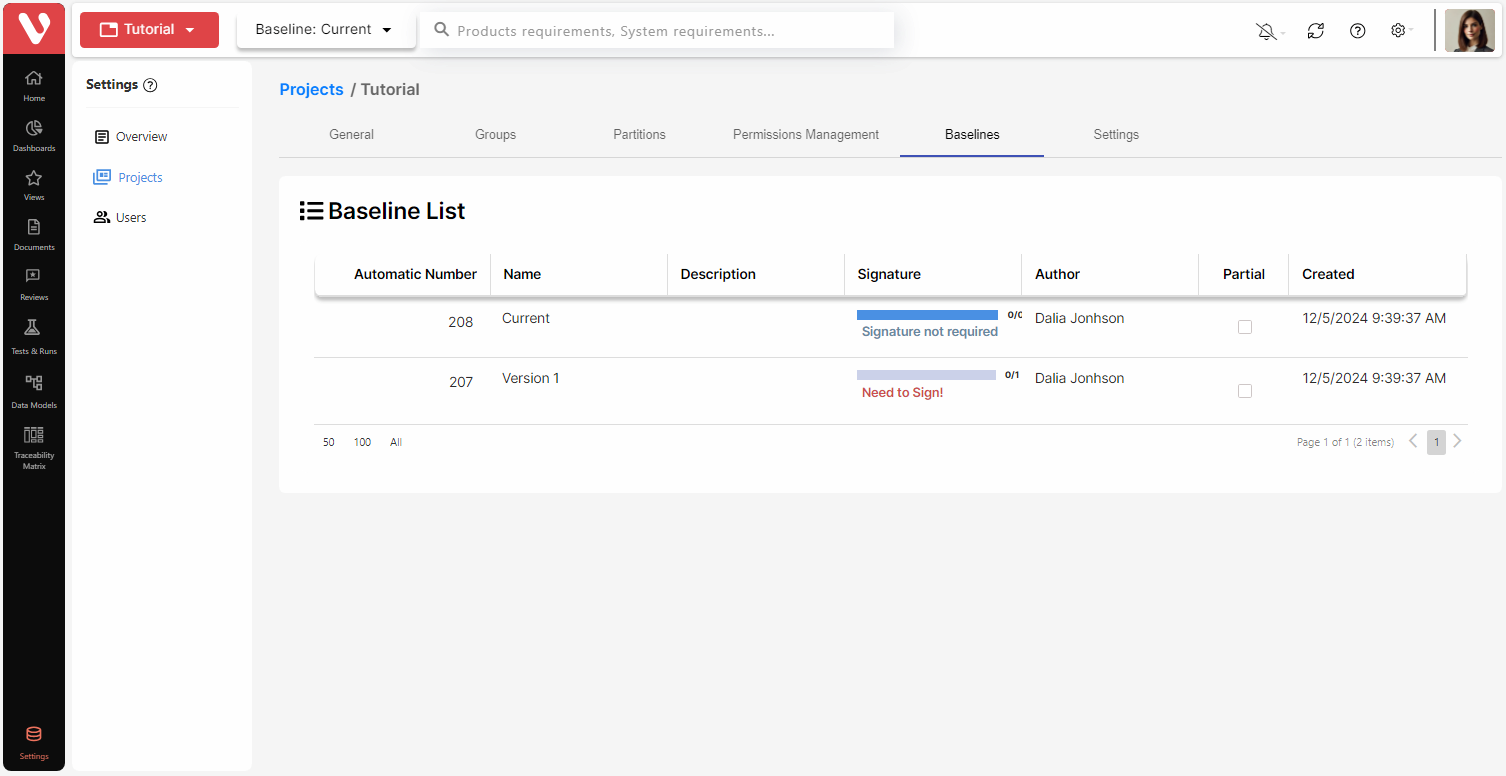
Status of Baselines signature
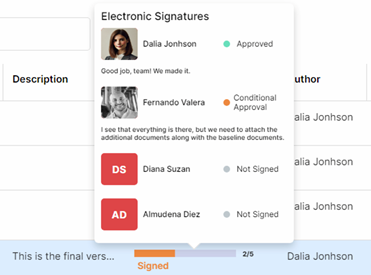
It is possible to see the status of signatures for each baseline hovering on top of the signature field, which will display a popup including:
- Users assigned to sign the baseline.
- Signature status for each user. The status can be:
- <Not signed>
- Approved
- Conditional approval
- Declined
- Commented
- Reviewed
- Comment added by the user when signing the baseline.
- Date on which the baseline was signed by each user.