
Settings
This tab displays all the project configurations that administrators can set up for the current project:
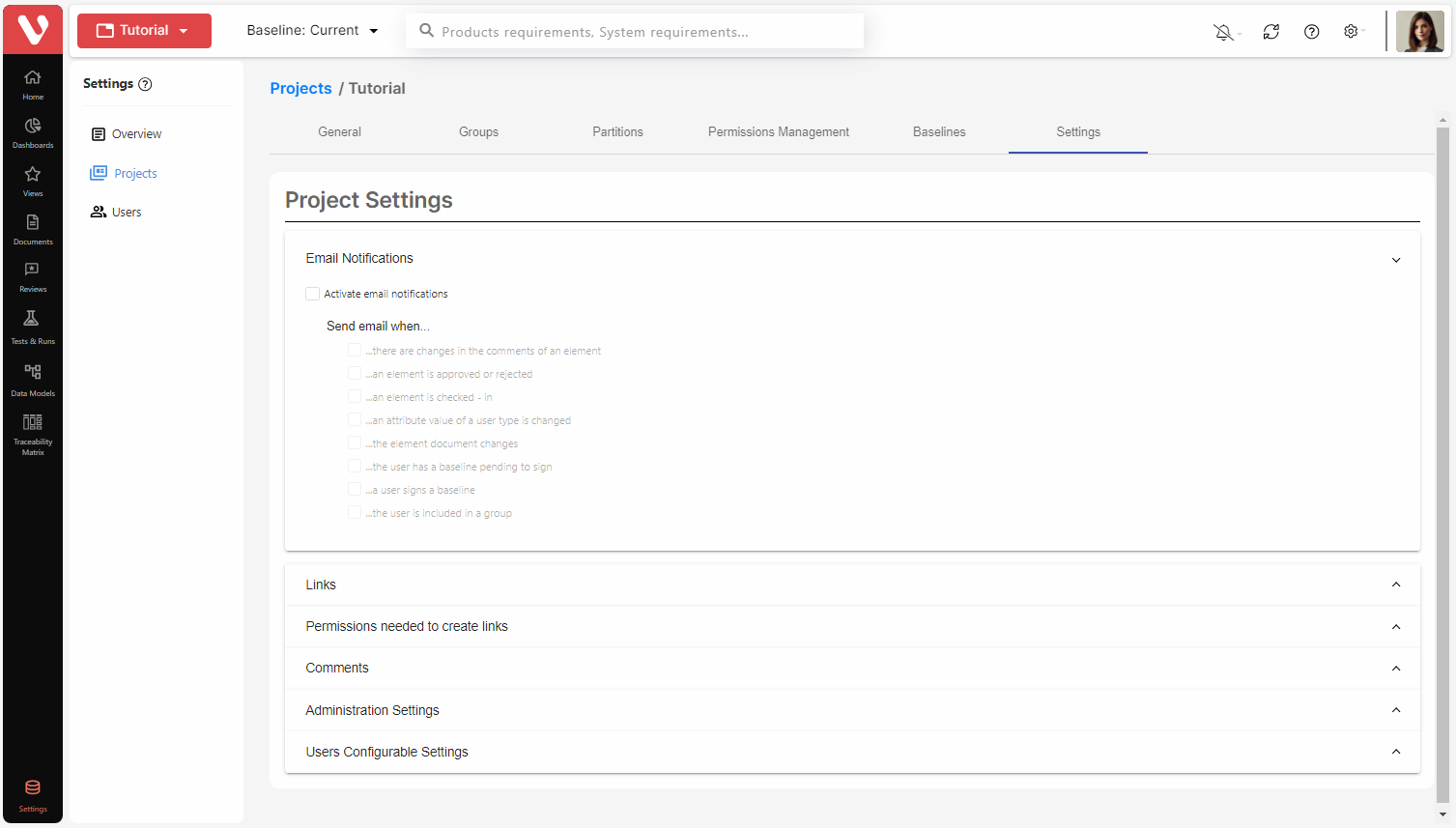
If any of these parameters are modified while the user has the project open, the modifications will only take effect when the user reopens it. In other words, modifications to project configuration parameters do not propagate automatically in projects that are open when the changes are made.
E-mail notifications
The administrator can activate the e-mail automatic notification in the project by activating this option in the Email Notifications section.
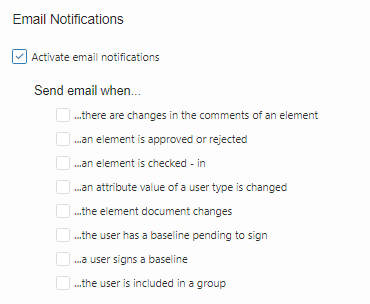
The administrator can also select when to send notifications. The available options are:
- Send e-mails when there are changes in the comments of an element (item or document): E-mails will be sent to subscribed users if there is any change in the comments of the element (a comment is added, replied to, solved, re-opened, deleted, transitioned to another status, etc.).
- Send e-mails when an element is approved or rejected (item): E-mails will be sent to subscribed users if there is any change in the approval of the item (the item is approved or rejected, or if an approval / rejection is cleared).
- Send e-mails when an element (item or document) is checked-in: E-mails will be sent to subscribed users every time the element is checked in by any user.
- Send e-mails when an attribute value of a user type is changed: E-mails will be sent every time the value of an attribute of the element (item or document) is changed, though the element is checked-out. This refers only to user-type attributes. The e-mail is sent to the user assigned as value of the attribute.
- Send e-mails when the element document changes: E-mails will be sent to subscribed users if an item is assigned to (or excluded from) a document. There are several possibilities in this case:
- A new item is created and assigned to a document. In this case, users subscribed to the document will receive an e-mail.
- An existing item is assigned to a document. In this case, users subscribed to the document will receive an e-mail.
- An existing item is moved from one document to another. In this case, users subscribed to each document will receive an e-mail.
- An existing item is excluded from a document. In this case, users subscribed to the document will receive an e-mail.
- Send e-mails when the user has a baseline pending to sign: E-mails will be sent to all users who are assigned to sign a baseline.
- Send e-mails when a user signs a baseline: E-mails will be sent to project administrators notifying that a user has signed a baseline. If the baseline has been fully signed by all signees, then the project administrators will also be notified.
- Send e-mails when the user is included in a group: E-mails will be sent to the user who is assigned to a user group.
When options 1, 2 or 3 are checked, e-mails are sent to the following users:
- Users subscribed to the element
- Author of the element (of version 1)
- Author of the current version of the element
- Authors of comments on the element that are not resolved
When option 4 is checked, the e-mail is sent ONLY to the user assigned as value of the attribute.
When option 5 is checked, e-mails are sent to the following users:
- Users subscribed to the document
- Author of the document (of version 1)
- Author of the current version of the document
- Authors of comments on the document that are not resolved
When a user accepts / rejects an item, the user is automatically subscribed to the item, so this user will receive e-mails when options 1, 2, 3 or 5 are checked.
When a user is assigned as value of an attribute (of User type), the user is automatically subscribed to the item, so this user will also receive e-mails when options 1, 2, 3 or 5 are checked.
IMPORTANT NOTE: To receive e-mail notifications, users may need to subscribe to items and/or documents.
Automatic link to global parameters
By activating this option, whenever a global parameter is included in the description of an item, a link will be automatically created between the item and the global parameter.

Once the option is activated, the characteristics of the link can be configured in the settings below the Automatic link to global parameters option.
In the Link type for automatic link to global parameters drop-down menu, you can select the link type that will be used to create the link between the item and the global parameter. The drop-down menu will display all the link types available in the project.
In the Direction for automatic link to global parameters drop-down menu, the direction for the link can be selected: from item to global parameter or the opposite.
Note: Notice that, if links restriction is active, the definition of these settings must be additional to the definition of a data model where the documents containing items and global parameters are linked. Also, the settings must be consistent with the link type and direction in the data model. In fact, the meaning of these settings is to identify which of all the links defined in data models are the ones for automatic linking of items and global parameters. It is recommended to use a specific link type assigned only to the global parameter links.
See below an example of a data model for global parameters linking that should be created additionally to the settings defined in the previous screenshot:
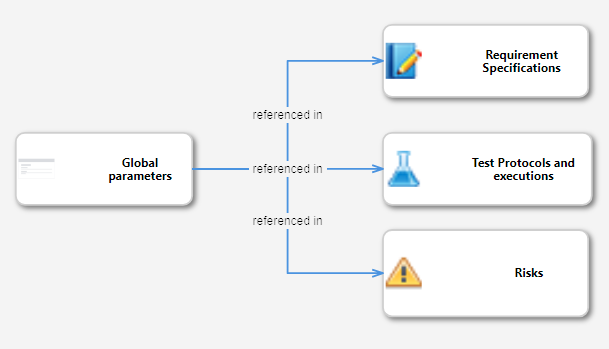
If the “referenced in” link type is only used in this data model, the effects in the project will be:
- Parameters belonging to the Global Parameter Document can only be referenced from the description of items belonging to Requirement Specifications, Test Protocols & Executions and Risks.
- A link from the item to the global parameter is automatically created with the “referenced in” link type.
Permissions needed to create links
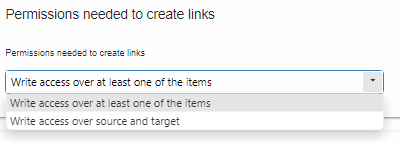
The administrator can define the permissions needed to establish links between elements. The options are:
- Write access over source and target.
- Write access over at least one of the items.
Configuration of permissions to establish links between elements is performed from the Settings tab:
Attributes for Comments
Users can review items and documents and add comments to them. There are two attributes for those comments that can be configured in the project.
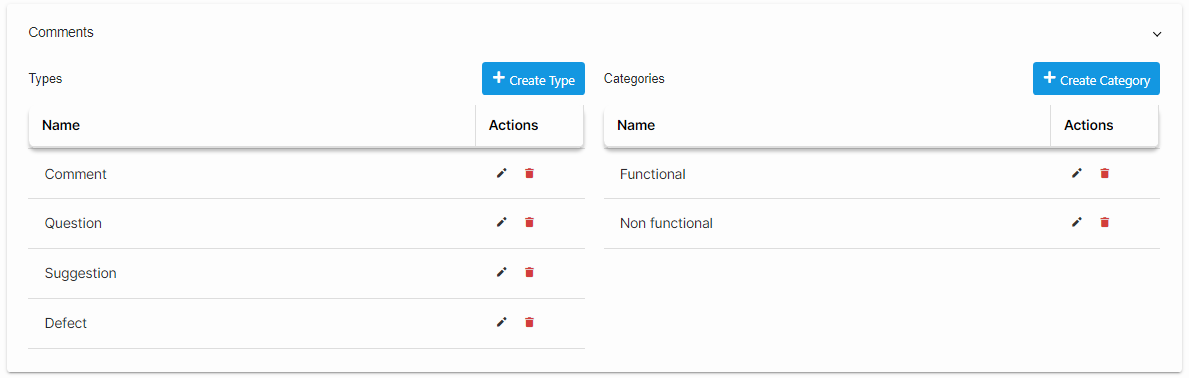
When a user adds a comment in Visure Requirements client, it will be possible to select the value of these attributes for the new comment. It will also be possible to filter comments according to the values of the attributes.
These attributes are:
- Type
- Category
To modify the values of the attributes, click on Create Type, Create Category buttons to create new values, or simply click on the edit or delete buttons to perform the corresponding action.
Administration Settings
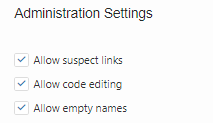
Allow suspect links
A link between two elements is suspect when one of the elements involved has been modified. Links may be set as suspect manually.
To view and establish the suspect links, this option needs to be activated. If this option is disabled, suspect links will not be tracked and will not be displayed.
Allow code editing
By activating this option, the codes of items can be modified at any time by any user with write permission over the corresponding items.
If a project administrator deactivates the option, from that moment on, and as long as the option remains deactivated, the codes for those elements will be fixed and may not be modified. In the dialog for definition of new elements, the tool proposes by default the code corresponding to the pattern set by the user or for the project, and it cannot be manually modified by the user.
Allow empty names
When this option is activated, it is not mandatory to enter a text in the name field for items.
User Configurable Settings: Project code configuration
When this option is enabled, administrators may configure the code configuration used for all items in the projects.
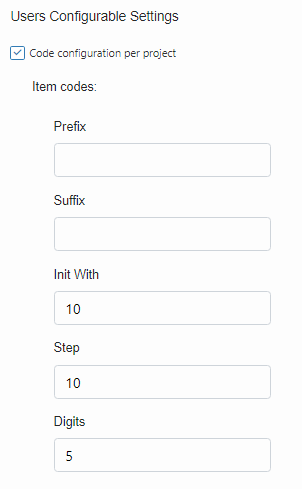
When users create a new item, the code will be proposed automatically following the pattern defined by the administrator in this setting.
If this option is not selected, a no prefix, no suffix, 5 digits, increment of 10 starting by number 10 pattern will be applied.