Editing document properties
When selecting a folder or document, it´s possible to edit multiple different types of properties through the properties panel. To edit any of these properties, it´s necessary to check out the element first.
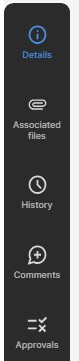
The Properties Panel has five sections:
- Details: In this tab, the user will be able to see and edit all the system and user (custom) attributes associated to the selected element.
- Associated files: Users can use this tab to attach files to the element.
- History: Every time an element is checked out, a new version is created, allowing users to see all the changes made to an element. Users will be able to see previous versions, compare them and restore older versions.
- Comments: These are comments associated with the element.